Jake's Resume Without Overleaf: A No-LaTeX Alternative
Want Jake's Resume without LaTeX? Compare Overleaf with a free no-code Jake template: the same layout, filled in with a form and downloaded as a PDF.
You don't need LaTeX or Overleaf to use Jake's Resume: ResumeFreePro has a free Jake Resume template that you fill in with a form and download as a PDF, with the same one-column layout, Computer Modern font and small-caps headings. If you already know LaTeX, Overleaf is still the best home for the original, and its free plan is enough for a resume.
This guide explains what Jake's Resume is, where LaTeX trips people up, and how the two ways of using it compare, so you can pick the one that fits you.
What Is Jake's Resume?
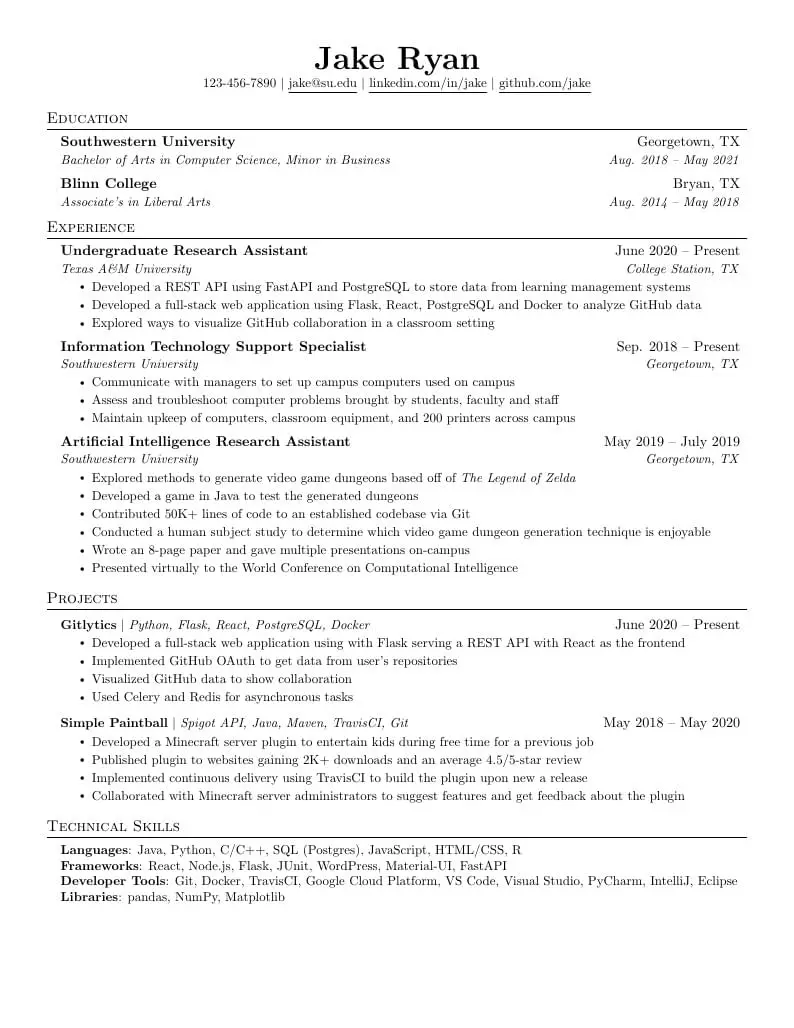
Jake's Resume is a free, one-page LaTeX resume template by Jake Gutierrez, published under the MIT license on GitHub and as a template on Overleaf. It uses a single column, the Computer Modern font, small-caps section headings with a rule under each, and US Letter paper (\documentclass[letterpaper,11pt]{article} in its source).
It is one of the most used resume templates in tech, especially on Reddit resume threads for software engineers and students.
6,600 — US searches a month for "jakes resume", plus 2,400 for "jake’s resume template" (Semrush, November 2026)
The GitHub repository had about 2,800 stars on 11 November 2026, and the Overleaf template page credits Jake Gutierrez and the MIT license. You can see the full layout on our Jake's Resume example page.
Is Overleaf Free for Jake's Resume?
Yes. Overleaf's free plan includes unlimited projects and lets you compile and download your PDF, which is all a one-page resume needs. On 11 November 2026, the Overleaf plans page listed these limits for the free plan: 1 collaborator per project, a "basic" compile timeout, 5 AI uses a day, and document history for the previous 24 hours only. None of those get in the way of a resume.
To use it: open the Jake's Resume template on Overleaf, click Open as Template, edit the .tex source on the left, and download the compiled PDF.
Where LaTeX Gets in the Way
The template itself is simple; the trouble is LaTeX syntax. Ten characters have special meaning in LaTeX, and typing them in plain text either breaks the compile or silently hides part of your resume. These are the ones that show up most on resumes:
| You type | What LaTeX does | What to write instead |
|---|---|---|
| R&D | Error: & separates table columns | R\&D |
| cut load time 40% | Everything after % is treated as a comment and disappears | 40\% |
| $120K revenue | $ starts math mode, so the text changes or errors | \$120K |
| C# | Error: # is a macro parameter | C\# |
| snake_case | Error: _ is subscript outside math mode | snake\_case |
| { } ~ ^ \ | Grouping, spacing, accents and commands | \{ \} \textasciitilde{} \textasciicircum{} \textbackslash{} |
The % one is the worst, because nothing errors: the rest of the line just goes missing from the PDF. On top of that, moving an existing Word or Canva resume into a .tex file means retyping every job by hand inside the template's macros.
Overleaf vs ResumeFreePro for Jake's Resume
Overleaf gives you the original LaTeX and full control; ResumeFreePro gives you the same layout without code, plus PDF import from your old resume. Here is how they compare:
| Overleaf (free plan) | ResumeFreePro (free plan) | |
|---|---|---|
| How you edit | LaTeX source code | A form, one card per job |
| Special characters (&, %, $, #) | Must be escaped | Type them normally |
| Import your old resume | No, retype it | Yes, upload a PDF (3 a month) |
| Layout control | Total: every margin and space | Fixed Jake layout, you edit the content |
| PDF downloads | No limit listed on the plans page | 8 a month, no watermark |
| Saving | Cloud projects, history for 24 hours | Autosaved, 2 resumes on a free account |
| ATS score and job-post match | No | 3 checks + 3 matches a month |
| Cover letter from the same resume | No | 2 AI cover letters a month |
| Price | Free | Free (Pro removes limits) |
Sources: Overleaf column from overleaf.com/user/subscription/plans, checked 11 November 2026. ResumeFreePro column from our pricing page and the limits our servers enforce.
When Overleaf Is the Better Choice
Stay on Overleaf if you know LaTeX, want to tune every margin, or want your resume in Git next to your code. Specifically:
- You want pixel-level control. In LaTeX you can change any spacing, add custom sections or squeeze in one more line. Our Jake template has a fixed layout; you change the content, not the template code.
- You download a lot. Overleaf's plans page lists no limit on compiling or downloading your PDF. Our free plan has 8 PDF downloads a month.
- You want the original. Ours is a careful rebuild in HTML with the same font and layout, not the LaTeX file itself, so line breaks can differ slightly from a LaTeX compile.
- You keep your resume in version control. A
.texfile diffs cleanly in Git.
If you are fine with LaTeX, there is no reason to switch. If you have ever lost an evening to a missing backslash, read on.
How to Make Jake's Resume Without LaTeX
Open the builder with the Jake template selected, add your details in the form (or import your old PDF), and download the PDF. Step by step:
- Open the builder with the Jake Resume template.
- Start from scratch, or choose Upload existing PDF to import your current resume. If the imported resume opens in a different template, switch it to Jake Resume in the template picker.
- Edit each job, project and skill in the form on the left. The page on the right updates as you type.
- Keep it to one page. Cut your weakest bullets instead of shrinking the font.
- Download the PDF. As a guest you get 1 download; a free account gets 8 a month, with no watermark.
Use Jake's Resume without writing a line of LaTeX.
Open the Jake TemplateWhat the free plan does not include
AI tailoring of your resume to a specific job post (ATS 2.0) is Pro-only, the export is PDF only (no Word file), and LinkedIn import is not available right now. Everything in the steps above works on the free plan.
Frequently Asked Questions
Can I use Jake's Resume without LaTeX?
Yes. ResumeFreePro has a free Jake Resume template with the same one-column layout, Computer Modern font and small-caps headings. You fill it in with a form and download a PDF, so there is no LaTeX code to write or compile.
Is Jake's Resume ATS friendly?
Generally yes. It is a single column with standard section headings and real, selectable text in the PDF, which applicant tracking systems read well. To check yours, open the PDF, select all, and paste it into a plain text editor: if it reads in the right order, an ATS can read it too.
Is Jake's Resume free to use?
Yes. The original LaTeX template is published under the MIT license, so anyone can use and change it. Overleaf's free plan and ResumeFreePro's free plan both let you build and download it at no cost.
Is Jake's Resume US Letter or A4?
The original LaTeX source uses US Letter paper (letterpaper). ResumeFreePro's Jake template also renders on US Letter. If you need A4 for a job in Europe or India, Overleaf lets you change letterpaper to a4paper in the source.
Is there a Google Docs or Word version of Jake's Resume?
Not an official one. People share Google Docs and Word copies of the layout, and their quality varies. ResumeFreePro exports PDF only, which is what most job portals and recruiters ask for.
How do I convert my old resume to Jake's Resume format?
On Overleaf you retype it into the .tex file. On ResumeFreePro you can upload your existing resume as a PDF; the builder fills in your jobs, dates, projects and education, and you switch the template to Jake Resume.
The Short Version
Jake's Resume is a free LaTeX template, and Overleaf is the right tool if you like LaTeX. If you just want the layout, fill in the free Jake template on ResumeFreePro and download a PDF, no code involved. For example bullet points to put in it, see our computer science resume example, built with the Jake layout, and our software engineer resume example. Comparing general resume builders? Read our free Zety alternative breakdown.
See the full Jake's Resume example, then build your own.
View the Jake Example